ads3

ads

How to Make Money with AI in 2026: 7 Best AI Side Hustles for Beginners


How to Make Money with AI in 2026: 7 Practical AI Side Hustles for Beginners

Artificial Intelligence is no longer just a future technology. In 2026, AI has become one of the fastest-growing opportunities for students, freelancers, creators, bloggers and small business owners.

From writing blog posts to creating YouTube scripts, designing social media posts, building websites, making thumbnails and automating business tasks, AI tools can help beginners start earning online with low investment.

The best part is that you do not need to be a coder or tech expert to start. You only need the right skill, the right AI tools and a practical way to solve real problems.

Recently, free AI learning resources have also become more accessible. Google has introduced beginner-friendly AI and cloud courses covering topics like large language models, image generation, responsible AI and cloud engineering, which shows how important AI skills are becoming for students and professionals.

In this article, you will learn 7 practical ways to make money with AI in 2026.


1. AI Content Writing Service

One of the easiest AI side hustles for beginners is content writing.

Businesses, bloggers, agencies and website owners need content every day. They need blog posts, product descriptions, website copy, social media captions, email content and YouTube scripts.

AI tools can help you create the first draft quickly. But the real money comes when you edit that content, improve the language, add SEO keywords and make it useful for readers.

Services you can offer:

  • SEO blog writing
  • Website content writing
  • Product description writing
  • Instagram caption writing
  • Email newsletter writing
  • YouTube script writing

Example offer:

I will write a 1000-word SEO blog article for your website using AI research + human editing.

Why this works:

Most businesses want content, but they do not have time to write regularly. If you can provide clean, readable and SEO-friendly content, you can start earning as a beginner.


2. AI YouTube Script Writing

YouTube is growing fast, and creators need scripts for long videos, shorts, reels and explainer content.

Many creators do not have time to research and write scripts daily. You can use AI to prepare video outlines, hooks, intros, storytelling flow and call-to-action sections.

Best niches for AI script writing:

  • Tech videos
  • AI tools
  • Finance basics
  • Business ideas
  • Educational videos
  • Motivational videos
  • Faceless YouTube channels

Example script package:

5 YouTube scripts per week + titles + descriptions + hashtags

This is a good service because video creators need content consistently. If your scripts help them save time, they may become monthly clients.

Research around generative AI monetization shows that creators are using AI for text, image and video workflows, including advertising, affiliate marketing and platform monetization strategies.


3. AI Social Media Content Creation

Every small business wants to look professional on Instagram, Facebook and LinkedIn. But many local businesses do not know what to post.

You can use AI tools to create content ideas, captions, post text, hashtags and monthly content calendars.

Then you can design posts using tools like Canva.

Businesses you can target:

  • Gyms
  • Salons
  • Coaching centers
  • Restaurants
  • Real estate agents
  • Accountants
  • Digital agencies
  • Local shops
  • Clinics

Services you can sell:

  • 30 Instagram post ideas
  • 15 captions
  • 10 reel ideas
  • Festival post content
  • Product promotion captions
  • Monthly content calendar

Example package:

Monthly Instagram Content Plan: 30 captions + 15 post ideas + 10 reel ideas

This is one of the best AI side hustles because small businesses need regular content but cannot always hire a full-time social media manager.


4. AI Thumbnail and Design Service

If you are creative, you can use AI and Canva to create thumbnails, posters, banners, ad creatives and social media graphics.

YouTube thumbnails are especially in demand because creators know that a good thumbnail can increase clicks.

Design services you can offer:

  • YouTube thumbnails
  • Instagram posts
  • Facebook ads
  • Blog featured images
  • Business posters
  • Festival creatives
  • Logo ideas
  • Presentation design

Tools you can use:

  • Canva
  • ChatGPT
  • Gemini
  • AI image generators
  • Background remover tools

You do not need to become a professional designer from day one. Start with templates, learn color combinations, improve typography and build a portfolio.


5. AI Resume and LinkedIn Profile Writing

Students and job seekers are always looking for better resumes, cover letters and LinkedIn profiles.

You can use AI to create ATS-friendly resumes, professional summaries, skill sections and cover letters.

Services you can offer:

  • Resume writing
  • Resume redesign
  • Cover letter writing
  • LinkedIn bio writing
  • Job-specific resume optimization

Target customers:

  • College students
  • Freshers
  • Job seekers
  • Internship applicants
  • Freelancers

Example offer:

I will create a professional ATS-friendly resume and LinkedIn bio for freshers.

This service is beginner-friendly because the demand is regular and clients are easy to find in student groups, LinkedIn and local communities.


6. AI Blogging and Affiliate Marketing

Blogging is still a strong way to earn money online, but now AI has made it easier to write and plan content faster.

You can start a blog around topics like AI tools, online earning, business ideas, apps, education, finance, blogging, gadgets or local services.

How bloggers earn money:

  • Display ads
  • Affiliate marketing
  • Sponsored posts
  • Digital products
  • Service leads

Blog topics that can work well:

  • Best AI tools for students
  • How to earn money online using AI
  • Best free AI tools for content creation
  • AI tools for YouTubers
  • AI side hustles for beginners
  • How to use ChatGPT for freelancing

Google Trends is useful for finding rising topics and related search terms. It has also added AI-powered keyword suggestions with Gemini, which can help creators compare topics and discover search opportunities faster.

Important tip:

Do not publish low-quality AI content directly. Always edit, add examples, improve headings, add original points and make the article useful.


7. AI Automation for Small Businesses

This is a high-value AI side hustle.

Many small businesses waste time on repetitive tasks like replying to customers, managing leads, creating invoices, sending reminders and updating Google Sheets.

You can learn simple automation and offer it as a service.

Automation ideas:

  • Auto-reply message templates
  • Google Sheets lead tracking
  • WhatsApp message templates
  • Email reply drafts
  • Customer follow-up system
  • Invoice reminder system
  • AI chatbot flow planning

Example service:

I will create a simple Google Sheets lead tracking system with automated follow-up message templates.

This type of service can pay more than basic content writing because it directly saves business time.


Best AI Tools for Beginners in 2026

Here are some beginner-friendly AI tools you can start with:

ChatGPT - content, ideas, scripts, coding help
Google Gemini - research and content planning
Canva - design, posts, thumbnails, posters
CapCut - reels and short video editing
Notion AI - notes, planning and productivity
Google Sheets - tracking leads and data

You do not need to learn 50 tools. Start with 3 tools and master them.

Best beginner stack:

ChatGPT + Canva + Google Sheets

With these three, you can offer content writing, social media planning, resume writing, basic design and business templates.


How to Start Making Money with AI in 7 Days

Here is a simple 7-day action plan:

Day 1: Pick one skill

Choose only one service first:

AI content writing
AI social media posts
AI resume writing
AI YouTube scripts
AI thumbnails

Day 2: Learn the tool

Use ChatGPT, Gemini or Canva and practice with sample work.

Day 3: Create 3 demo samples

Examples:

  • 1 blog article
  • 1 Instagram post set
  • 1 resume sample
  • 1 YouTube script
  • 1 thumbnail design

Day 4: Create a simple offer

Example:

I create SEO blog articles for small businesses using AI research and human editing.

Day 5: Post on social media

Share your offer on WhatsApp status, Instagram story, LinkedIn and Facebook groups.

Day 6: Message potential clients

Contact local businesses, creators, coaches, students or agencies.

Day 7: Deliver one free or low-cost sample

Your first goal is not big money. Your first goal is proof, feedback and portfolio.


Common Mistakes Beginners Should Avoid

1. Depending only on AI

AI is a tool, not a full business. You must edit, improve and customize the output.

2. Copy-pasting AI content

Direct copy-paste content can look generic. Add examples, personal experience and useful details.

3. Learning too many tools

Do not waste time trying every new AI tool. Learn a few tools deeply.

4. No portfolio

Clients want to see samples. Create demo work even if you do not have clients yet.

5. No niche

“AI service” is too broad. Choose a clear service like AI blog writing, AI thumbnails or AI resume writing.


Final Words

AI is one of the best opportunities for beginners in 2026, but it is not a magic money machine. You can make money with AI only when you use it to solve real problems.

Start small. Pick one service. Build samples. Message clients. Improve your skill. Then increase your pricing.

The people who will earn the most with AI are not the people who only know tools. They are the people who know how to use AI for writing, design, marketing, automation and business growth.

So, if you are a student, freelancer, blogger or beginner, this is the right time to start your AI side hustle.


FAQs

Can beginners make money with AI in 2026?

Yes, beginners can make money with AI by offering services like content writing, social media posts, resume writing, YouTube scripts, thumbnails and automation.

Which AI side hustle is best for students?

AI content writing, resume writing, social media captions and Canva design are good options for students because they need low investment.

Do I need coding to earn money with AI?

No, coding is not required for many AI side hustles. You can start with writing, design, blogging, scripts and social media services.

Which AI tools should beginners learn first?

Beginners can start with ChatGPT, Google Gemini, Canva, CapCut and Google Sheets.

Is AI blogging profitable in 2026?

AI blogging can be profitable if you publish useful content, optimize for SEO, target the right keywords and monetize through ads, affiliate marketing or services.

Top 5 Budget Gaming Keyboards in India (2025): Best RGB, Mechanical & Semi-Mechanical Options Reviewed


🎮 Top 5 Budget Gaming Keyboards Review (2025) — Features, Pros, Cons & Best For Whom

Agar aap ₹600–₹1500 ke budget me gaming keyboard dhund rahe ho, toh ye 5 keyboards India me sabse zyada popular aur value-for-money options hain. Yaha maine inke features, gaming experience, RGB quality, build, pros, cons — sab kuch compare karke ek mast, informative aur attractive review likha hai.


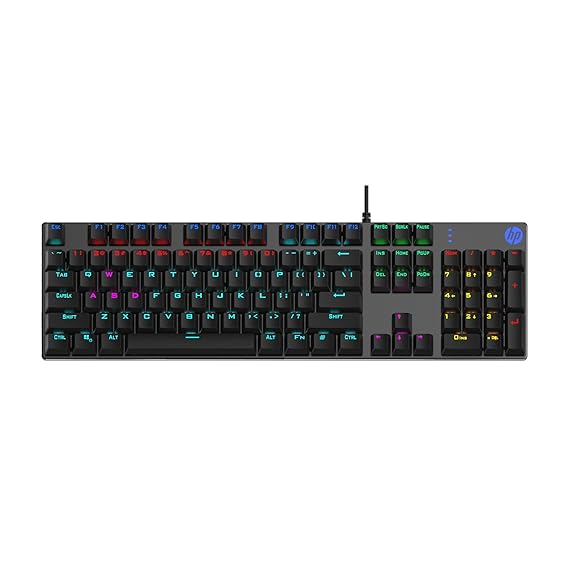
1️⃣ HP GK400Y Mechanical Gaming Keyboard

⭐ Best for: Budget Mechanical Gaming Experience


BUY NOW :- https://amzn.to/4oiwJyV
Highlights:

Why Gamers Love It:
Mechanical feel, smooth keystrokes, fast response — FPS aur eSports ke liye perfect. RGB lighting kaafi bright hai aur effects kaafi premium lagte hain.

Pros:
✓ True mechanical switches
RGB Light Sync
✓ Durable build
✓ Great for fast typists & gamers

Cons:
✗ Slightly louder keys
✗ No wrist rest


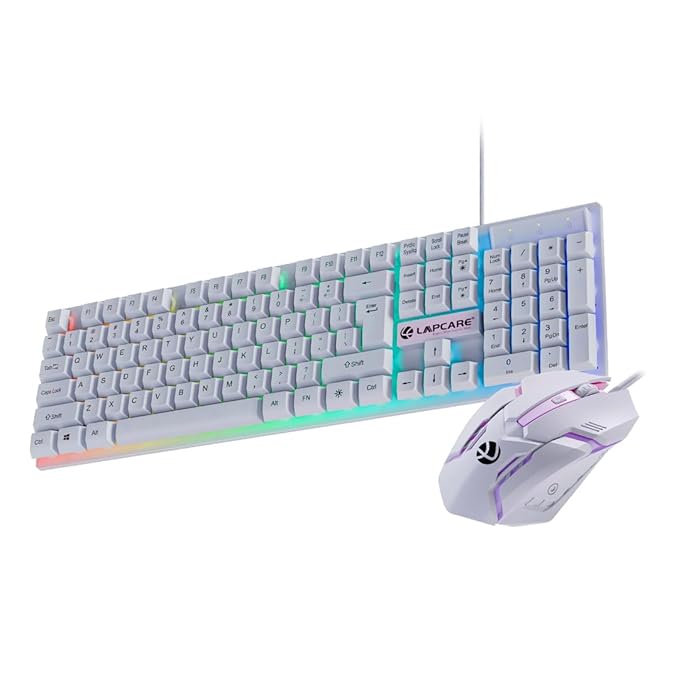
2️⃣ LAPCARE RAPIDO Gaming Keyboard + Mouse Combo


BUY NOW :- https://amzn.to/4nY7tNU

⭐ Best for: Beginners & Casual Gamers

Highlights:

  • RGB lighting

  • Membrane keys (soft feel, low sound)

  • 8 million keystroke life

  • Mouse included: Optical, precise tracking

  • USB plug & play

Why It’s Popular:
Combo ka price bahut low hota hai — beginners, students, casual gamers ke liye best. RGB decent hai, keys soft and comfortable.

Pros:
✓ Best budget combo
✓ Smooth membrane keys
✓ Mouse + keyboard together
✓ Good for normal use + light gaming

Cons:
✗ Not mechanical
✗ Build quality average


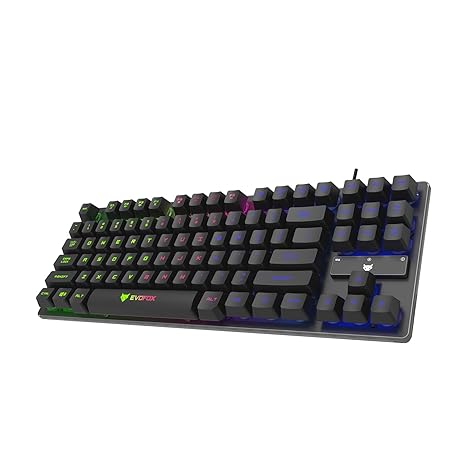
3️⃣ EvoFox Fireblade TKL Semi-Mechanical Keyboard


BUY NOW :- https://amzn.to/4i6JpY0

⭐ Best for: Compact Setup + Good Gaming Feedback

Highlights:

  • TKL (Tenkeyless) design — small & portable

  • Semi-mechanical floating keycaps

  • Rainbow backlit + breathing effect

  • 19 anti-ghosting keys

  • Strong braided cable

Why Gamers Choose It:
Semi-mechanical keys ka feel mechanical ke close hota hai. RGB ka breathing effect awesome look deta hai. TKL size desk space bachata hai — perfect for laptop/PC gaming setups.

Pros:
✓ Compact
✓ Semi-mechanical feel
✓ Anti-ghosting ⇒ better gaming
✓ Stylish RGB

Cons:
✗ No number pad
✗ RGB not customizable


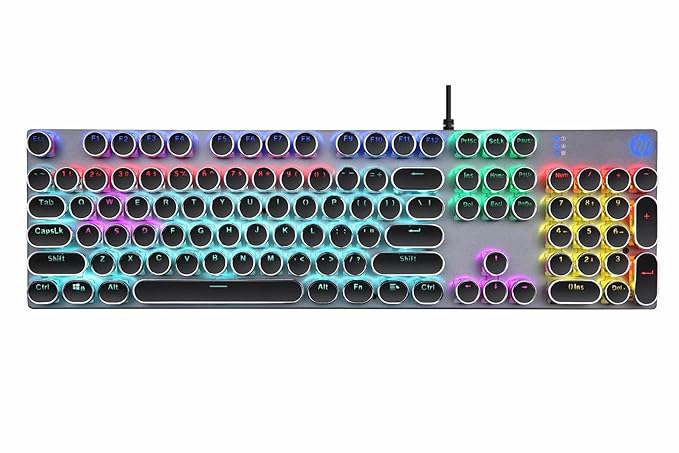
4️⃣ HP GK400F Mechanical RGB Gaming Keyboard


BUY NOW :- https://amzn.to/49WI97H

⭐ Best for: Durability + Heavy Use

Highlights:

  • Full-size mechanical keyboard

  • Metal top panel

  • Dust & spill resistant

  • Strong RGB backlit

  • Premium build

Why It Stands Out:
GK400Y se thoda heavy-duty version. Metal panel + spill-resistant design isse long-term rough use ke liye perfect banata hai.

Pros:
✓ Very sturdy
✓ Mechanical keys feel premium
✓ Durable metal panel
✓ Great for long gaming sessions

Cons:
✗ Slightly heavy
✗ No dedicated software customization


5️⃣ Ant Esports KM540 Gaming Keyboard + Mouse Combo


BUY NOW :- https://amzn.to/3LGRXbY

⭐ Best for: RGB Lovers + Budget Gaming Combo

Highlights:

  • Rainbow backlit keyboard

  • Wrist rest included

  • 7D programmable mouse (up to 3600 DPI)

  • Spill-resistant body

  • USB plug & play

Why Gamers Prefer It:
₹1000–₹1500 range me ye combo ek beast hai. Mouse me DPI modes + programmable buttons + RGB — sab expected se zyada premium. Keyboard me wrist rest long gaming sessions ke liye comfortable hai.

Pros:
✓ Great RGB keyboard + mouse combo
3600 DPI gaming mouse
✓ Wrist rest included
✓ Spill-proof build

Cons:
✗ Not mechanical
✗ Keyboard lighting not fully customizable

100 Excel Shortcuts You Must Know for Faster Work

 100 Excel Shortcuts You Must Know for Faster Work 

MS Excel is very powerful and useful.  Top 100 Excel shortcuts blew. They can save your time and increase your work efficiency.

Basic Excel Shortcuts

  1. Ctrl + N – Create a new workbook

  2. Ctrl + O – Open an existing workbook

  3. Ctrl + S – Save the workbook

  4. F12 – Save As

  5. Ctrl + P – Print workbook

  6. Ctrl + C – Copy selected cells

  7. Ctrl + X – Cut selected cells

  8. Ctrl + V – Paste

  9. Ctrl + Z – Undo

  10. Ctrl + Y – Redo

Navigation Shortcuts

  1. Ctrl + → – Move to the last column with data

  2. Ctrl + ← – Move to the first column with data

  3. Ctrl + ↑ – Move to the top row with data

  4. Ctrl + ↓ – Move to the bottom row with data

  5. Home – Move to the beginning of a row

  6. Ctrl + Home – Go to cell A1

  7. Ctrl + End – Go to last used cell

  8. Page Up – Scroll up one screen

  9. Page Down – Scroll down one screen

  10. Alt + Page Up/Page Down – Move one screen left/right

Selection Shortcuts

  1. Shift + Arrow Keys – Extend selection by one cell

  2. Ctrl + Shift + Arrow – Select entire row/column until last filled cell

  3. Ctrl + A – Select entire sheet

  4. Ctrl + Shift + Space – Select entire column

  5. Shift + Space – Select entire row

  6. Ctrl + Space – Select column of active cell

  7. Ctrl + Shift + End – Select to last used cell

  8. Ctrl + Shift + Home – Select to A1

  9. F8 – Extend selection mode

  10. Shift + F8 – Add to selection

Formatting Shortcuts

  1. Ctrl + 1 – Format cells dialog box

  2. Ctrl + B – Bold

  3. Ctrl + I – Italic

  4. Ctrl + U – Underline

  5. Alt + H + H – Fill color

  6. Alt + H + F + C – Font color

  7. Ctrl + Shift + $ – Apply currency format

  8. Ctrl + Shift + % – Apply percentage format

  9. Ctrl + Shift + # – Apply date format

  10. Ctrl + Shift + @ – Apply time format

Row & Column Shortcuts

  1. Ctrl + Shift + “+” – Insert new cell/row/column

  2. Ctrl + “-” – Delete selected cells

  3. Ctrl + 9 – Hide selected rows

  4. Ctrl + Shift + 9 – Unhide rows

  5. Ctrl + 0 – Hide selected columns

  6. Ctrl + Shift + 0 – Unhide columns

  7. Shift + Space – Select entire row

  8. Ctrl + Space – Select entire column

  9. Alt + I + R – Insert row

  10. Alt + I + C – Insert column

Formula Shortcuts

  1. = (Equal sign) – Start a formula

  2. Alt + = – AutoSum

  3. Ctrl + ` – Show formulas

  4. F2 – Edit cell

  5. Shift + F9 – Calculate active sheet

  6. F9 – Calculate all worksheets

  7. Ctrl + Shift + Enter – Enter array formula

  8. Ctrl + Shift + “ – Copy value from cell above

  9. Ctrl + ‘ – Copy formula from cell above

  10. Alt + Enter – Insert line break in cell

Data Handling Shortcuts

  1. Ctrl + T – Create table

  2. Ctrl + L – Create list/table

  3. Alt + A + T – Filter

  4. Alt + Down Arrow – Open filter menu

  5. Alt + E + S + V – Paste Special → Values

  6. Alt + E + S + T – Paste Special → Formats

  7. Alt + H + S – Sort menu

  8. Alt + D + F + F – Add/remove filter

  9. Alt + N + V – Insert PivotTable

  10. F11 – Create chart from selection

Workbook & Window Management

  1. Ctrl + Tab – Switch between workbooks

  2. Ctrl + F4 – Close workbook

  3. Ctrl + W – Close window

  4. Ctrl + N – New workbook

  5. Ctrl + Shift + N – New workbook (template)

  6. Alt + Tab – Switch between apps

  7. Ctrl + F2 – Print preview

  8. Alt + F1 – Create chart in same sheet

  9. Alt + F8 – Macro dialog box

  10. Alt + F11 – Open VBA editor

Search & Replace

  1. Ctrl + F – Find

  2. Ctrl + H – Replace

  3. Ctrl + Shift + F – Advanced find

  4. Ctrl + Shift + H – Advanced replace

  5. Alt + Enter – Insert new line in a cell

  6. Ctrl + Shift + L – Toggle filter

Miscellaneous Shortcuts

  1. F4 – Repeat last action

  2. F7 – Spell check

  3. F1 – Help

  4. Ctrl + ; – Insert current date

  5. Ctrl + Shift + : – Insert current time

  6. Ctrl + K – Insert hyperlink

  7. Shift + F2 – Insert/edit comment

  8. Ctrl + Shift + U – Expand formula bar

  9. Ctrl + Alt + V – Paste special dialog

  10. Alt + E + S + F – Paste formula

  11. Alt + E + S + W – Paste column width

  12. Ctrl + Shift + “+” – Insert cell

  13. Ctrl + - – Delete cell

  14. Ctrl + Shift + & – Apply outline border

Apply these shortcut keys in your daily life for practice.

How to Make Money With Affiliate Marketing as a Beginner

 How to Make Money With Affiliate Marketing as a Beginner

Do you know what affiliate marketing is? It’s like telling your friends about a cool toy, and when they buy it, the shop gives you a gift. In affiliate marketing, you share links to products online, and when someone buys through your link, you earn money. Simple, right?

Let’s see how beginners can start making money with affiliate marketing in 2025:

1. Understand Affiliate Marketing

Affiliate marketing means promoting someone else’s product. You don’t make the product, you just recommend it. When someone buys using your link, you get a commission (money for helping them sell).

2. Pick a Niche

A niche means your topic. It can be gadgets, fashion, fitness, or even gaming. Choose something you love because you’ll talk about it a lot.

3. Join Affiliate Programs

Sign up for programs like:

  • Amazon Associates – for almost everything

  • Flipkart Affiliate – in India

  • ClickBank – for digital products

  • CJ Affiliate – for many brands

4. Create a Platform

Where will you share your links? You need a place like:

  • A blog

  • A YouTube channel

  • Social media (Instagram, Pinterest, etc.)

5. Share Helpful Content

Don’t just post links! Make guides, reviews, or videos to help people choose the right product. Example: “Top 5 Headphones Under ₹2000” and put your affiliate link there.

6. Drive Traffic

The more people see your content, the more clicks you get. Use:

  • SEO for blogs

  • Hashtags on social media

  • Pinterest pins

  • Short videos (Reels, Shorts)

7. Be Honest

Only recommend things you trust. People will follow you if you give honest advice.

5 Passive Income Ideas That Actually Work

5 Passive Income Ideas That Actually Work

Do you know what passive income means? It’s like planting a tree. At first, you work hard to plant it and water it. But after some time, it gives you fruits without much work. Sounds cool, right? That’s what passive income does – you work once and keep earning money later.

Here are 5 passive income ideas that really work in 2025:

1. Start a YouTube Channel

Imagine making videos about games, toys, or fun stories. People watch them, and YouTube gives you money for ads. You just make the video once, and it can earn for years!

2. Write an eBook

If you love stories or know something interesting, write a small book and sell it on Amazon Kindle. People can buy it even when you are sleeping.

3. Make an Online Course

Are you good at drawing, coding, or even solving puzzles? Make a video course and put it on websites like Udemy. Every time someone buys it, you get money!

4. Start a Blog

Write about things you like—games, cartoons, or tips. Later, you can put ads on your blog and earn money every time people visit.

5. Sell Digital Products

Create things like coloring pages, planners, or wallpapers. Sell them on sites like Etsy. You make them once, and people keep buying again and again!

Why Passive Income is Awesome?

Because you can earn money while playing, sleeping, or doing homework. But remember, first you need to work hard to set it up. After that, it feels like magic money!

Top Freelancing Platforms to Start Your Career in 2025

Top Freelancing Platforms to Start Your Career in 2025

Hey there! Do you know what freelancing means?
It’s like doing jobs for people without going to an office. You sit at home (or even in your favorite park), use your computer, and earn money. Cool, right?

Now in 2025, freelancing is super popular. Many people work from home and make lots of money. If you want to start, you need a good place where people can find you and give you work. These places are called freelancing platforms. Let me tell you about the best ones:

1. Upwork

Imagine a big marketplace where people post jobs like “I need someone to write a story” or “I need a cool logo.” That’s Upwork!

You make an account, tell what you can do (like drawing, writing, coding), and apply for jobs.

2. Fiverr

This one is fun! On Fiverr, you can say, “I will make a drawing for $5” or “I will write a song for you.” People come and buy your work like a shop.

3. Freelancer

It’s just like Upwork. Lots of jobs for writers, designers, programmers, and many more. You can join and start working for people around the world.

4. Toptal

This one is for experts! If you are super smart in coding, design, or finance, Toptal gives you big projects. But you need to be really good to join here.

5. PeoplePerHour

This is like a job board where people post small tasks, and you can pick them. Perfect for beginners!

6. LinkedIn

You know LinkedIn? It’s not just for chatting; it’s for jobs too! Many companies hire freelancers from here. Just make a cool profile and show your work.

7. Workana

This platform is famous in Latin America but anyone can join. You can do writing, design, or coding jobs here too.

8. 99designs

If you love drawing or designing logos, this is your place! People run contests for logos, and you can join to win money.

9. Guru

It’s an easy platform where you can show your skills and get projects quickly. Great for all kinds of work!

10. Contra

This is a new platform where freelancers don’t pay extra fees. So, you earn more money! It’s simple and beginner-friendly.

Why Start Freelancing in 2025?

Because you can work from anywhere, anytime. You don’t need to wait to grow up to start. Even kids can learn skills like writing, drawing, or coding and become freelancers when they are older.

So, what do you think? Which platform do you want to try when you grow up? 

10 Side Hustles in 2025 That Anyone Can Start From Home

10 Side Hustles in 2025 That Anyone Can Start From Home

Hey buddy! Imagine if you could make some extra pocket money without even leaving your house. Cool, right? Well, in 2025, lots of people are starting little jobs on the side (we call them side hustles) to earn money while still doing school, a job, or other fun stuff. Let me tell you about 10 easy ones anyone can try from home.

1. Selling Crafts Online

If you like making things like drawings, bracelets, or stickers, you can sell them online. Websites like Etsy let you show your cool creations to the whole world. You can also sell your art on Amazon, Flipkart, your Own Website/Online Store, etc.

2. Teaching Online 

Are you good at math, drawing, or even video games? You can teach others through video calls. People love learning from someone who knows the tricks. You can open your YouTube channel & Website. You can also use Freelancing sites & Education sites like Coursera & Alison.

3. Writing Stories or Blogs 

If you enjoy writing fun stories or sharing your thoughts, you can write blogs. Websites and companies even pay people to write for them. You can start your own blog site through WordPress & Blogger.

4. Creating YouTube Videos 

Love making fun videos? YouTube is still huge in 2025. You can teach, play games, or just share cool stuff. If people like your videos, you can earn money.

5. Social Media Helper 

Big people who own shops need help posting on Instagram, TikTok, or Facebook. You can help them by creating posts and replying to comments.

6. Selling Old Stuff Online 

Have old toys, clothes, or gadgets you don’t need? You can sell them online on apps like eBay or Facebook Marketplace.

7. Voice Work 

If you’ve got a fun voice, you can record yourself reading stories, ads, or even voices for cartoons. People pay for that!

8. Online Surveys & Reviews 

Some companies pay you to answer questions or test their apps and games. It’s like giving your opinion and earning at the same time.

9. Virtual Assistant 

This is like being a helper for someone busy. You answer emails, plan schedules, and remind them of important stuff — all from your computer.

10. Designing with AI 

In 2025, AI tools are super smart! You can use them to design logos, pictures, or even short videos. People pay you for creative ideas.

What is Print-on-Demand (POD) and How Can You Make $500/Month?


1. Introduction – What is Print-on-Demand (POD) and How Can You Make $500/Month?

Imagine you have a magic shop.
In this shop, you don’t keep any products ready — instead, when someone buys a t-shirt, mug, or bag from you, a special company makes (manufactures) it only after they place their order.

That’s what Print-on-Demand means —
You design it → The customer buys it → The company prints it → The company sends it to the customer.
You don’t have to make, store, or send anything yourself.

2. Benefits of POD -

  • No big money needed to start — You don’t need to buy 100 t-shirts in advance.

  • Low risk — You only make a product when someone has already paid for it.

  • Fun and creative — You can put your own funny quotes, pictures, or ideas on products.

  • Easy- It's easy to start POD.

3. Setting a $500/Month Goal – Breaking Down the Numbers

Let’s do some easy math.

  • Suppose you earn $5 profit from each product you sell.

  • To make $500 in a month, you need to sell:

         500 ÷ 100 products per month

That means:

  • 100 products/month

  • About 25 products/week

  • Around 3–4 products/day

It’s like selling 3-4 items every day.

4. Start POD journey


If you want to start selling through POD. You have to follow this process 👇🏼.
    Choose Your Niche Make Designs Find POD Partner Set up Store/Website  Marketing.

(I) Choose Your Niche- 

 First, you have to shortlist a niche. There are some examples  👇🏼
  • Pets → Funny dog quotes, cute cat art, etc.

  • Hobbies → Gaming, gardening, painting, etc.

  • Sports → Gym lovers, cricket fans, football fans, etc.

  • Lifestyle → Coffee addicts, travelers, book lovers, etc.

  • Trends → Viral memes, movie quotes, trending jokes, etc.

(II) Make Designs-

After selecting a niche. Now make designs around it. 
Tools for making designs👇🏼
  • You can use free tools like Canva, Photopea, or Kittle
  • Paid tools like Photoshop, Illustrator, etc.
If you want to hire a freelancer for that, go to Fiverr or Upwork.

(III) Find POD Partner-

 Now you have to find your POD Partner. There are many websites where you can find different POD suppliers at one place. 
Top Print-on-Demand Companies 👇🏼.
  1. Printful

    • Very popular and beginner-friendly

    • High-quality products (t-shirts, mugs, hoodies, posters, etc.)

    • Connects easily with Shopify, Etsy, WooCommerce

  2. Printify

    • Huge product catalog (500+ items)

    • You can choose from many suppliers (different prices & quality)

    • Works with Shopify, Etsy, and more

  3. Teespring (now Spring)

    • Free to start, no upfront cost

    • Good for creators and influencers

    • Connects with YouTube & social media

  4. Redbubble

    • Marketplace POD site (you don’t need your own website)

    • Lots of traffic from people already searching for designs

    • Good for artists and beginners

  5. Zazzle

    • Wide range of customizable products (stationery, gifts, clothes, etc.)

    • Works like a marketplace (similar to Redbubble)

  6. TeePublic

    • Easy to upload and sell designs

    • Good exposure for t-shirts and apparel

    • Lower profits, but beginner-friendly

  7. Gelato

    • Ships globally from local printing centers

    • Fast delivery worldwide

    • Works with Shopify, WooCommerce, Etsy

   (IV)  Set up Store/Website - There are two ways.

 Option 1: Selling on a Marketplace (Etsy + Printful/Printify)

👉 This is best for beginners because you don’t need to bring your own traffic.

Step 1: Make an Etsy Account

  • Go to Etsy.com

  • Click on “Sell on Etsy” and sign up

Step 2: Connect with a POD Company

  • Create a free account on Printful or Printify

  • Link your Etsy shop with Printful/Printify (they have a simple connect button)

Step 3: Upload Your Designs

  • Choose a product (t-shirt, mug, hoodie, etc.)

  • Add your design using Printful/Printify’s mockup generator

  • Publish it directly to your Etsy shop

Step 4: Set Pricing

  • Example: T-shirt costs you $12, you sell it for $20 → Profit = $8

  • Make sure you keep at least $5 profit per product

Step 5: Go Live

  • When a customer buys from Etsy → Printful/Printify prints & ships automatically

  • You keep the profit, and Etsy + Printful/Printify handle the rest

Option 2: Selling on Your Own Website (Shopify + Printful/Printify)

👉 This is for people who want to build a brand and scale beyond $500/month.

Step 1: Create a Shopify Store

  • Go to Shopify.com

  • Sign up for the free trial and choose a store name

Step 2: Install a POD App

  • Go to Shopify App Store

  • Install Printful or Printify app

  • Connect your POD account to Shopify

Step 3: Add Products

  • Upload your designs on t-shirts, mugs, or hoodies inside the POD app

  • Push them to your Shopify store

Step 4: Customize Your Website

  • Add logo, colors, and banners to make it look like a real brand

  • Write clear product descriptions with keywords (SEO)

Step 5: Set Pricing

  • Same as Etsy → Example: Printify charges $12, you sell for $20, profit = $8

Step 6: Marketing (Most Important)

  • Share your products on Instagram, TikTok, and Pinterest

  • Run Facebook or Instagram ads to reach your target audience

  • Build an email list so customers come back

When someone orders → Shopify notifies Printful/Printify → They print & ship → You get the profit.

(V) Marketing- 

Here are some tips & tricks for marketing.
  1. Social MediaPost designs on Instagram, TikTok, and Pinterest with trending hashtags.

  2. Niche Focus Share products in Facebook groups & pages related to your niche.

  3. Seasonal ProductsCreate designs for holidays like Christmas, Valentine’s, and Halloween.

  4. Discounts & UrgencyUse offers like “Buy 2 Get 1 Free” or “20% Off Today Only.”

  5. SEO KeywordsUse specific titles like “Funny Dog Mom T-Shirt” instead of “Cool T-Shirt.”

  6. Email MarketingCollect emails with discounts & send new product updates.

  7. Short VideosUse TikTok & Reels to make fun, viral-style product videos.

  8. Cheap AdsRun $5–10/day Facebook or Instagram ads to test designs.

  9. Customer SharingAsk buyers to share photos of themselves wearing/using your product.

  10. Keep Adding DesignsUpload 2–3 new designs weekly to increase chances of sales.

_______________________________Thanks for Reading__________________________________
If you have any Doubts & questions. Please ask me.


ads2

How to Make Money with AI in 2026: 7 Best AI Side Hustles for Beginners

  How to Make Money with AI in 2026: 7 Practical AI Side Hustles for Beginners Artificial Intelligence is no longer just a future technolog...